Take a first call
Use New case when you are taking the call yourself. Calls received from an answering service or another connected feed appear in First calls for review.
Open a case while taking a call
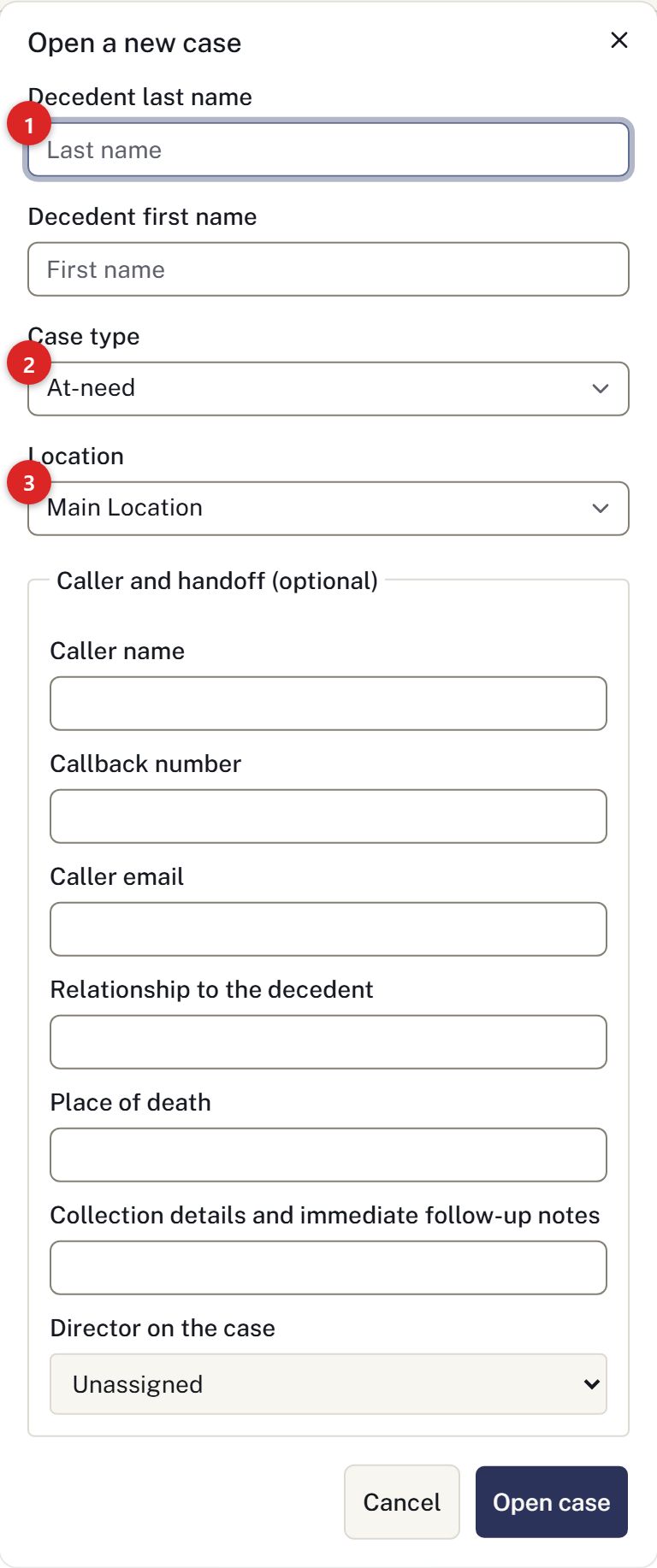
- Open Cases and select New case.
- Enter the decedent's last name. Add a first name if you have it.
- Choose At-need for a death that has occurred, or Pre-need for an arrangement in advance.
- Check the location handling the case. A location is required; with only one available, it is selected for you.
- Record the caller and callback number in Caller and handoff (optional). Choose a director and add the collection notes you have.
- Select Open case. The case opens directly, with the caller saved under Family & contacts.
The case receives a number automatically. Check the caller under Family & contacts, including their telephone number and relationship. If the caller was not recorded during intake, add them here. Record the information you have and return to incomplete fields later.
Review a call from a feed
- Open Intake → First calls and find the call under Awaiting review.
- Check whether a case already exists before opening another.
- Select Open a case.
- Review the reported name and place of death, then the caller. Choose Use as primary contact if the family should be called through this person first; it does not make them the informant, next of kin or payer. Choose the Assigned director, or Leave unassigned. Correct any errors.
- Select Open the case.
The call moves to Reviewed and links to its case. Its location comes from the intake feed. The original report stays with the call, marked unverified. The case opens with Continue this case, which links to Assign the director, Confirm the family contact and Arrange the removal.
If the death is already recorded, select Link to a case instead. Find the active case by surname or case number, enter the Reason for linking and select Link the call. Linking keeps the call and does not change the case or its contacts.
Choose Discard for a duplicate, wrong number or test call, then confirm Discard the call. Discarding cannot be undone. The call remains visible; if discarded by mistake, use its details to open a case manually.
If a colleague has already dealt with the call, reload the page to see the result.
Review a correction after linking a call
Open Intake corrections on a call already linked to a case. Select the name or place-of-death fields being corrected, enter the proposed values, and record the source and reason. Saving a correction does not change the case.
Compare the original report, current case and proposed values. Select only the changes to apply, add a review reason, then select Apply selected changes. With no fields selected, use No case change needed. Completed cases permit this review outcome but cannot receive field changes.
If the case changed while you were reviewing, use Review latest case values and check the comparison again. Your selections and reason remain available. The original report and the reviewed before-and-after values remain in history. Open corrections also appear in Corrections awaiting review, including calls that have already been reviewed. Caller contacts are not changed by this workflow.
Arrange the collection
If the firm is collecting the decedent, use Removals. Record other movements in Chain of custody.
An owner can connect an intake feed.
Calls to the firm’s telephone line
When the firm’s inbound telephone service is configured, callers choose a coverage area and the system routes the call through the on-call rota. A configured fallback line handles exhausted coverage. Telephone routing does not itself open a case.
A first-call proposal can show linked telephone history, including the caller number, area, call status and attempted recipients. Review this alongside the submitted details.
This death may already be recorded lists possible duplicate first calls or cases. Follow each candidate link and compare the details before opening a new case. A shared telephone number or surname does not prove two records describe the same death. The panel does not merge records.
When reviewing one linked first call, use All first calls to return to the queue.
For a worked example with screenshots, see Take a first call and assign the next step.