Firm settings
For a new firm, first check the general settings: name, address details, time zone and working week. Set up locations, invite staff, then prepare the price list and forms. Configure payments and messaging only if the firm will use them.
Before the first live case
Use an agreed training case to check that staff can open the right location's record, produce a correct statement and form, and complete the work their role requires. Review prices, taxes, contact details and letterhead before using the output with a family.
Find a settings page
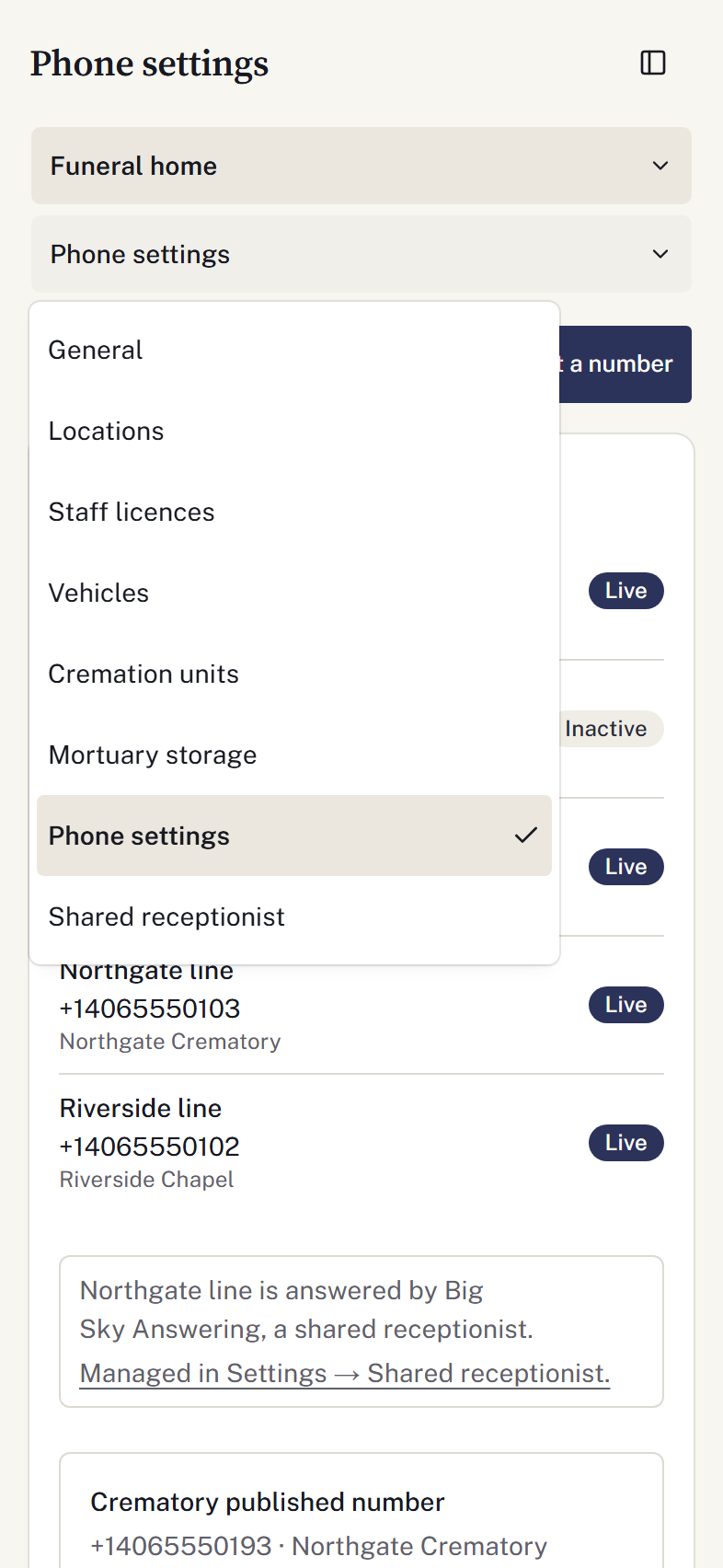
In instructions such as Settings → Finances → Checkbooks, Finances is the group and Checkbooks is the page. On desktop, find the page beneath its group heading in the Settings rail. On a phone, choose the group in the first dropdown, then the page in the second. Choosing a group alone keeps your current page open.
Staff records are also available through Staff → People and Staff → Licences. Vehicles has a direct link under Firm. Pages and actions depend on your permissions; an existing bookmark still opens the same route.
Save configuration deliberately
Choose a settings destination from the left navigation on desktop or the two dropdowns on a phone: choose a group, then a page. Save each form before leaving. If asked about unfinished edits, keep editing or discard deliberately. After a failed save, check the error and retained entries before retrying. An unavailable settings list is not an empty configuration.
Before the first arrangement, confirm packet definitions, required signers, family-review wording, funding policies and the service-confirmation policy with the firm's responsible staff.