Run the funeral on the day
A funeral is scheduled for the afternoon. The bearers need to arrive 45 minutes before it starts, the flowers are due before the family arrives, and one director is coordinating the day.
Before the team starts
- Open the case and review Services. Confirm the occasion, time, venue, staff and vehicle. Check each occasion separately when the funeral and committal have separate bookings.
- Review the case checklist, Waiting on, Suppliers and Ordered & arrived. Resolve outstanding preparations or give the next action a named owner. A scheduled service alone does not establish that the case is ready.
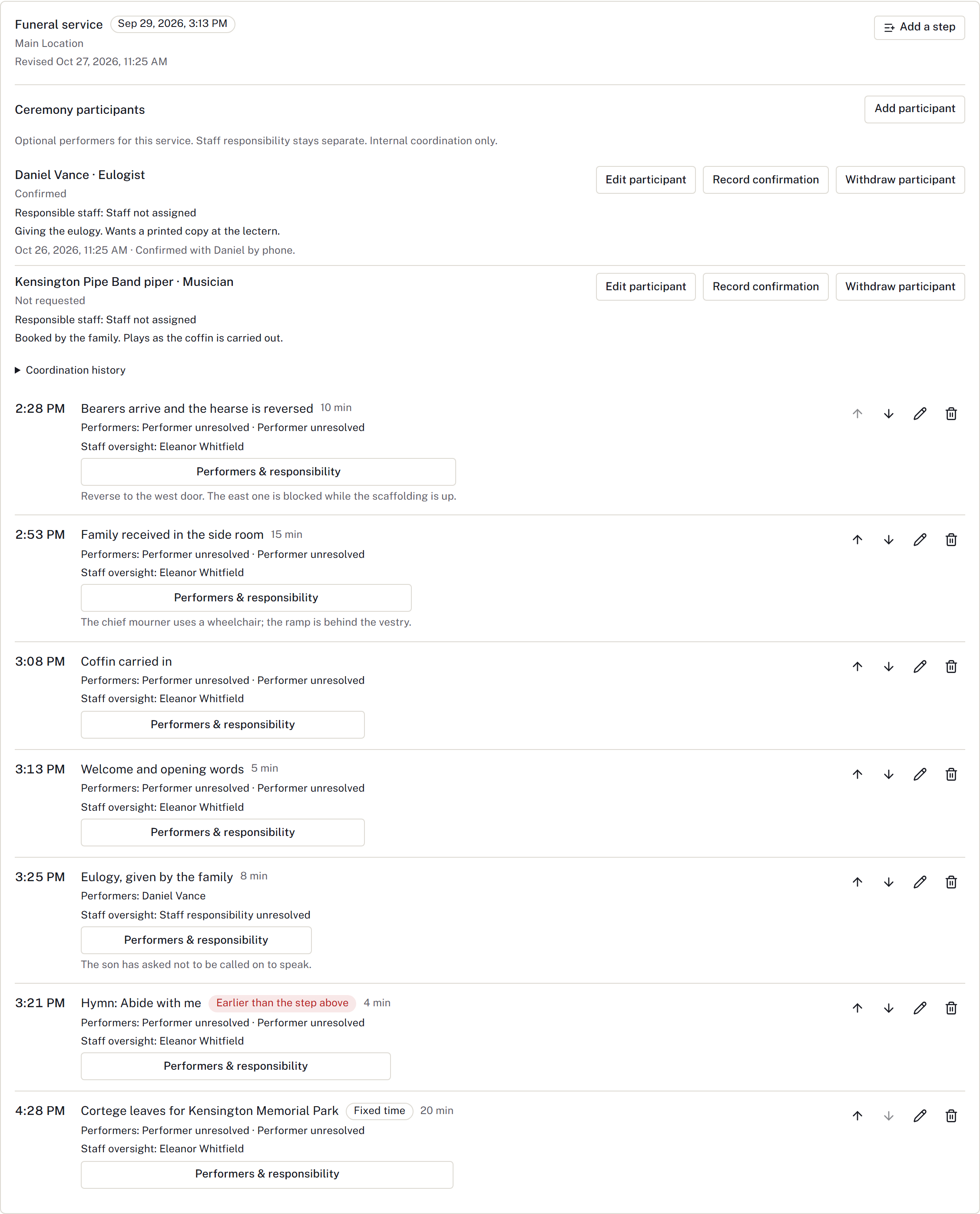
- Open Running sheet and find the service. Apply a suitable template to an empty sheet, or select Add a step to build the sequence.
- For each step, enter what happens, Led by, and any Note for staff. For the bearers, choose Relative to the service and enter -45 minutes. Use A fixed time for an appointment that must keep its own time.
- Review the order and times. If a step shows Earlier than the step above, correct its time or move it into the intended order before printing. Then select Print for the staff copy and check the printed service details with the team before work begins.
During and after the service
Use the running sheet to coordinate the sequence. Record completed work in the relevant case records: mark manual checklist tasks complete, record supplier deliveries, and record any required custody or disposition handover. The running sheet sets out the plan; it has no step-completion control.
If the service changes, follow Handle changed arrangements and replace the staff printout. If something remains outstanding, record the next action and include it in the shift handover.
Finished when: the day's work is recorded, remaining commitments have an owner, and the next colleague can distinguish completed work from the plan. Continue with payment and closeout review when appropriate.
Check current confirmation and changes
Before using the running sheet, check Service confirmation, outstanding Arrangement change reviews, service-notice acknowledgements and applicable newspaper placements. Use financial clearance for the firm's required approval. A provisional or outdated confirmation needs review even when a printed schedule exists.
Print from the saved running sheet after resolving changes. It is a working copy; reprint after a time or instruction change. Record any belongings return separately in Belongings.
Record ceremony participants
In Running sheet, use Ceremony participants for performers such as the officiant, musicians, readers and pallbearers. Select Add participant, choose a family contact, a directory contact or an external person, then set the Role and Order. Choose the Responsible staff member who coordinates them; the performer and the staff responsibility stay separate.
Use Record confirmation to note when it was confirmed and the evidence. Moving the service time or venue shows Service changed — reconfirm. On a step, Participants & staff names the performers and whether staff oversight is required. Participants are for internal coordination; nothing is shared with the family.
Prepare an internal ceremony draft
In Ceremony draft, choose the participants to include, review their draft names and roles, and put them in order. Nobody is included automatically. Select Save draft to retain a sample of those details.
Each saved version keeps its original wording. Record Needs changes or Reviewed draft with a note against that version. Both are staff review outcomes; the sample remains Draft — not approved for sharing.
Changed event details, selected participant details or availability can make a saved version outdated. Review the latest details before saving another version. Private coordination notes and unselected participants do not appear in the sample. Saved history remains available if the event is removed. These internal samples do not create family documents or approve publication.